সরাসরি লেখায় যান
BetterDocs by MSF
  • Home
  • Popular Docs
    • Category Box Sleek
      • Category Box Card
      • Category Box Classic
      • Category Box_Box
    • Category Grid L1
      • Category Grid L2
    • Sidebar L1
      • Sidebar L2 B
      • Sidebar L3 B
      • Sidebar L4 B
      • Sidebar L5 B
      • Sidebar L6 B
      • Sidebar L7 B
    • Related Categories B
    • Archive Doc List L1
      • Archive Doc List L3
      • Archive Doc List L2
    • Category Handbook
    • Multiple KB Box
      • Multiple KB Classic
    • Multiple KB Tab
    • Encyclopedia
      • Encyclopedia Modern L
      • Encyclopedia Retro L
    • FAQ Modern L
      • FAQ Classic L
      • FAQ Tab L
      • FAQ Abstract L
  • Popular Docs
    • Category Box Sleek L
      • Category Box Card L
      • Category Box Box L
      • Category Box Classic L
    • Category Grid Default L
      • Category Grid L2
    • Category Archive List L2
      • Category Archive List L1
    • Encyclopedia Classic L
      • Encyclopedia Retro L
      • Encyclopedia Modern L
    • Multiple KB Sleek L
      • Multiple KB Classic L
      • Multiple KB Card L
      • Multiple KB Box L
    • Sidebar L1
      • Sidebar L2
      • Sidebar L 3
      • Sidebar L 4
      • Sidebar L 5
    • FAQ Abstract Layout
      • FAQ Tab Layout
      • FAQ Modern Layout
      • FAQ Classic Layout
    • Tab View List
    • Attachment_Related Docs
  • Category Box 2 SC
    • Category Box SC
    • Category Grid 2 SC
    • Category List SC
    • Category Grid SC
    • FAQ List Classic SC
    • FAQ List Modern SC
    • Feedback Form SC
    • MK List SC
    • Multiple KB 2 SC
    • KB Tab Grid SC
    • Multiple KB SC
    • Popular Articles SC
    • Search Form SC
  • Home
  • Popular Docs
    • Category Box Sleek
      • Category Box Card
      • Category Box Classic
      • Category Box_Box
    • Category Grid L1
      • Category Grid L2
    • Sidebar L1
      • Sidebar L2 B
      • Sidebar L3 B
      • Sidebar L4 B
      • Sidebar L5 B
      • Sidebar L6 B
      • Sidebar L7 B
    • Related Categories B
    • Archive Doc List L1
      • Archive Doc List L3
      • Archive Doc List L2
    • Category Handbook
    • Multiple KB Box
      • Multiple KB Classic
    • Multiple KB Tab
    • Encyclopedia
      • Encyclopedia Modern L
      • Encyclopedia Retro L
    • FAQ Modern L
      • FAQ Classic L
      • FAQ Tab L
      • FAQ Abstract L
  • Popular Docs
    • Category Box Sleek L
      • Category Box Card L
      • Category Box Box L
      • Category Box Classic L
    • Category Grid Default L
      • Category Grid L2
    • Category Archive List L2
      • Category Archive List L1
    • Encyclopedia Classic L
      • Encyclopedia Retro L
      • Encyclopedia Modern L
    • Multiple KB Sleek L
      • Multiple KB Classic L
      • Multiple KB Card L
      • Multiple KB Box L
    • Sidebar L1
      • Sidebar L2
      • Sidebar L 3
      • Sidebar L 4
      • Sidebar L 5
    • FAQ Abstract Layout
      • FAQ Tab Layout
      • FAQ Modern Layout
      • FAQ Classic Layout
    • Tab View List
    • Attachment_Related Docs
  • Category Box 2 SC
    • Category Box SC
    • Category Grid 2 SC
    • Category List SC
    • Category Grid SC
    • FAQ List Classic SC
    • FAQ List Modern SC
    • Feedback Form SC
    • MK List SC
    • Multiple KB 2 SC
    • KB Tab Grid SC
    • Multiple KB SC
    • Popular Articles SC
    • Search Form SC

Parent

2
  • আপনার প্ল্যাটফর্মটি সদস্য পর্যায়ে সদস্যদের আচরণ ট্র্যাক এবং দেখার জন্য কী কী ক্ষমতা প্রদান করে?
  • Child 1
    • ওয়ার্ডপ্রেস প্লাগইন রিলিজ
    • জ্যাক ফল
    • আম
    • আপেল
    • আঙ্গুর
    • ওয়ার্ডপ্রেস প্লাগইন রিলিজ
    • Grand Child 2
      • kola bd
      • আঙ্গুর
      • How does your system manage multiple expiration dates for offers based on different member statuses?
      • Can your loyalty platform support a multi-tiered program that offers members additional benefits based on spend thresholds, enrollments, or paid subscriptions?
      • How does your system ensure that member profile data (including profile tiers, point balance across currencies, recent transactions, coupons, etc.) is accessible to Customer Service representatives?
      • Describe the variety of earn mechanisms your platform can support (including but not limited to the ability to earn for transactions/purchases across categories/channels, ability to earn for non-transactional engagement based actions, etc.)
      • Explain how to enable users accruing points (near-real time) for purchase activity in the context of ecommerce and retail
      • Explain how to enable users accruing points (near real-time) for transactions on partner channels, wholesale partners and can you support different earning constructs for partners.
      • Can user interface/experience be modified based on locale? (e.g. Tier Status more important than point value in Asia; may not be the same in NA/EMEA) How is language translation managed?
      • How To Purchase Our Subscription?
      • Describe how the system can maintain the individual loyalty member’s acceptance of program’s Terms and Conditions. Please include how it handles versioning of T&C’s wand tracking which version a member has accepted?
      • Banana
      • kola bd
      • Explain how to enable users accruing points (near-real time) for purchase activity in the context of ecommerce and retail
      • Explain how to enable users accruing points (near real-time) for transactions on partner channels, wholesale partners and can you support different earning constructs for partners.
      • Describe the variety of earn mechanisms your platform can support (including but not limited to the ability to earn for transactions/purchases across categories/channels, ability to earn for non-transactional engagement based actions, etc.)
      • How does your system ensure that member profile data (including profile tiers, point balance across currencies, recent transactions, coupons, etc.) is accessible to Customer Service representatives?
      • Describe how the system can maintain the individual loyalty member’s acceptance of program’s Terms and Conditions. Please include how it handles versioning of T&C’s wand tracking which version a member has accepted?
      • Can user interface/experience be modified based on locale? (e.g. Tier Status more important than point value in Asia; may not be the same in NA/EMEA) How is language translation managed?
      • Banana
      • Can your loyalty platform support a multi-tiered program that offers members additional benefits based on spend thresholds, enrollments, or paid subscriptions?
      • How does your system manage multiple expiration dates for offers based on different member statuses?
      • How To Sign Up For Updates?
      • Grape
      • How To Purchase Our Subscription?

Alif

2
  • This is life
  • Ghum Pasce
  • Huddle with Shakib bhai
  • Explain how to enable users accruing points (near-real time) for purchase activity in the context of ecommerce and retail
  • How does the software handle awarding points for transactions that use a “buy now, pay later” service?
  • Explain how to enable users accruing points (near-real time) for purchase activity in the context of ecommerce and retail
  • Huddle with Shakib bhai
  • Ghum Pasce
  • This is life
View Categories
  • Home
  • Docs
  • Uncategorized
  • HOW TO USE ADVANCED DRAG & DROP BUILDER TO ORGANIZE CONTENT IN BETTERDOCS?

HOW TO USE ADVANCED DRAG & DROP BUILDER TO ORGANIZE CONTENT IN BETTERDOCS?

muammar-shahrear-famous
Updated on সেপ্টেম্বর 9, 2024

2 min read

AI Doc Summarizer Doc Summary
AI Doc Summarizer Thinking Thinking

BetterDocs PRO comes with an advanced Drag & Drop Builder, which allows you to organize all your documentation instantly. You can easily move any content to another category and sort it according to your preferred order. Most impressively, you can add a New post, edit it, or even delete your existing posts from one place.

Before you begin, make sure that you have created some posts in BetterDocs and assigned categories to those posts. Once the posts are published, you can view them in the BetterDocs Drag & Drop interface. For more details, you can check out our article on How to create and publish docs in BetterDocs. Now, let’s follow the below guidelines to use the Advanced Drag & Drop Builder and organize your content in BetterDocs:

Navigate To ‘All Articles’ Page #

First, go to your WordPress Dashboard and then navigate to wp-admin -> BetterDocs -> All Articles. On the ‘All Articles’ page, you will find the Drag & Drop Builder to sort out the documentation per your requirements. You will find each of the documents under its respective categories.
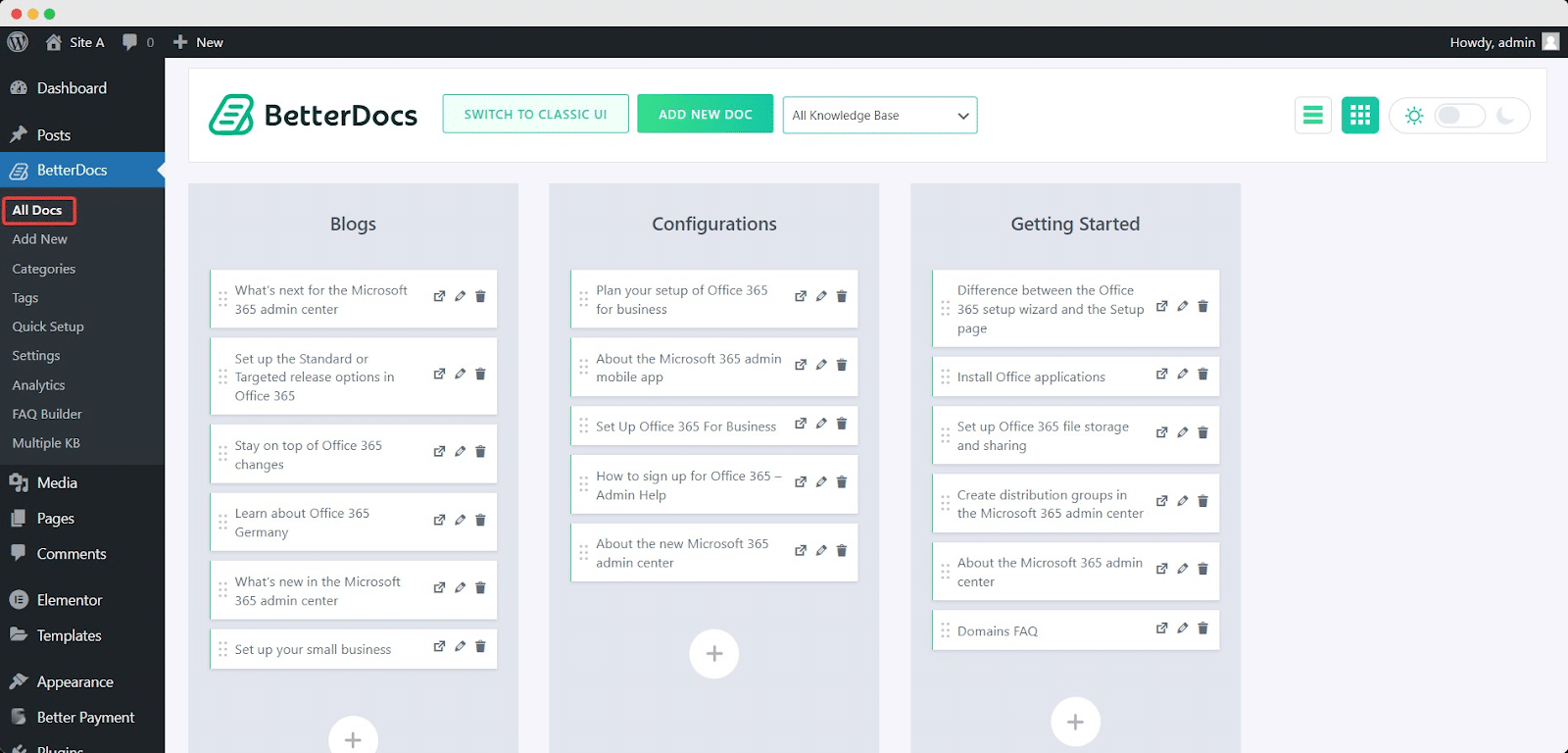
Drag and Drop Builder

Move Docs From One Category To Another #

You can easily move your mouse over the document you want to move from one category to another, and then simply drag & drop it to your preferred category. It will be instantly saved. Besides, you can even sort out the order of the articles by moving them up or down as well.
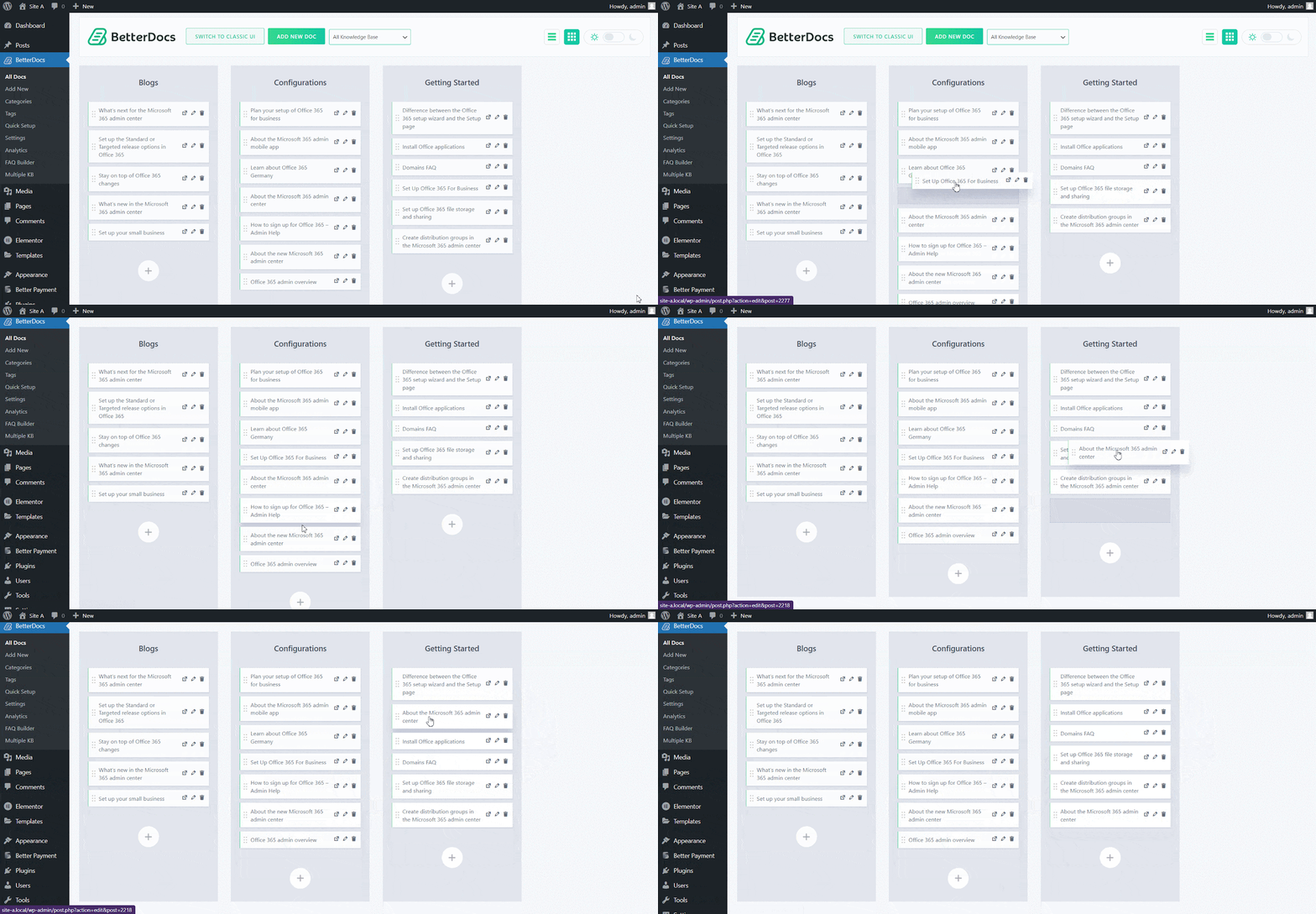
Drag and Drop Builder

Add A New Article #

At the top of the screen, you will find the button ‘Add a New Article’ to create a New document. You will then be redirected to the New article page, where you can create your New document. Alternatively, you can hit on the ‘+’ icon from the ‘Drag & Drop Builder’ to create New posts as well.
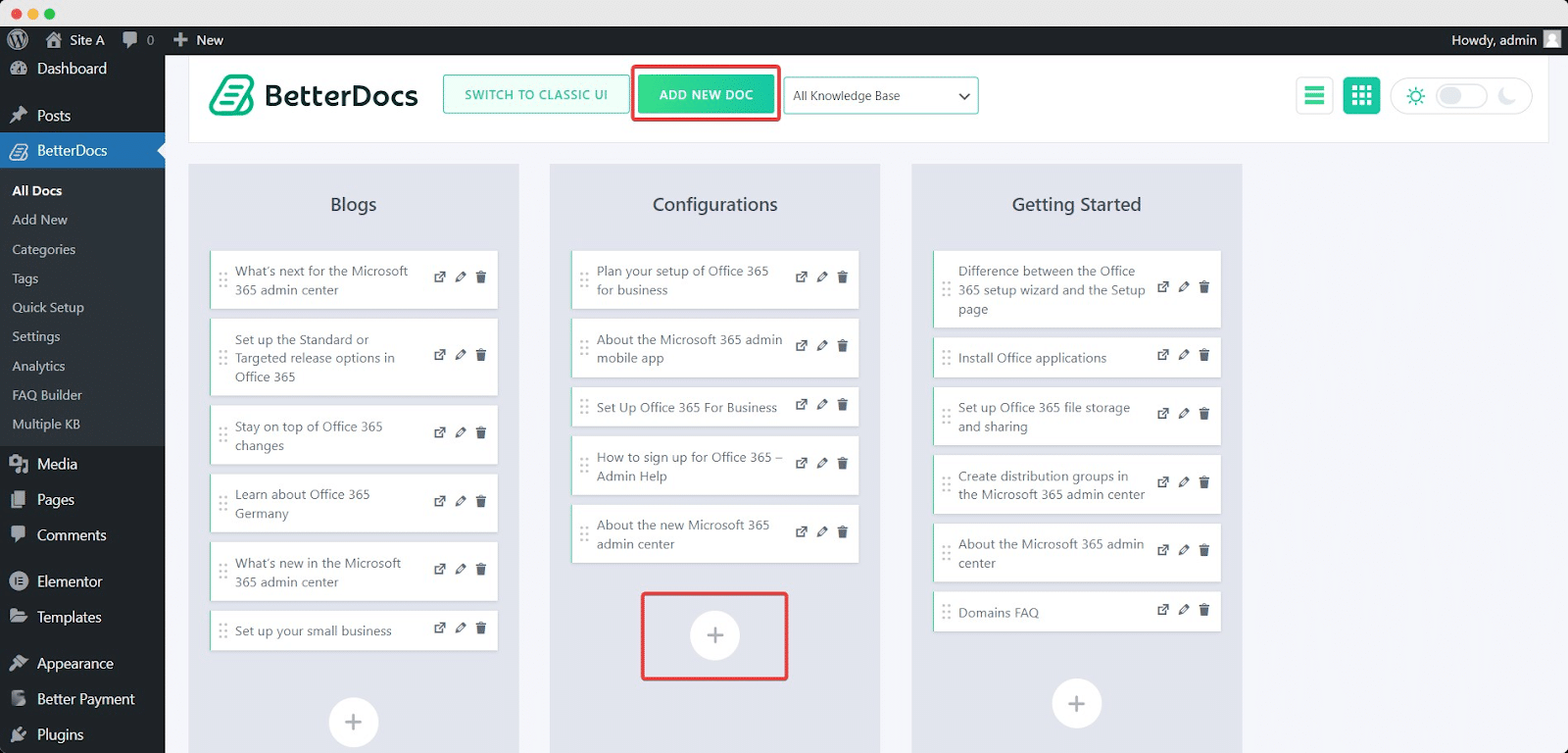
Drag and Drop Builder

Edit or Delete Articles #

BetterDocs Drag & Drop Builder allows you to edit or delete your existing articles all from one place.
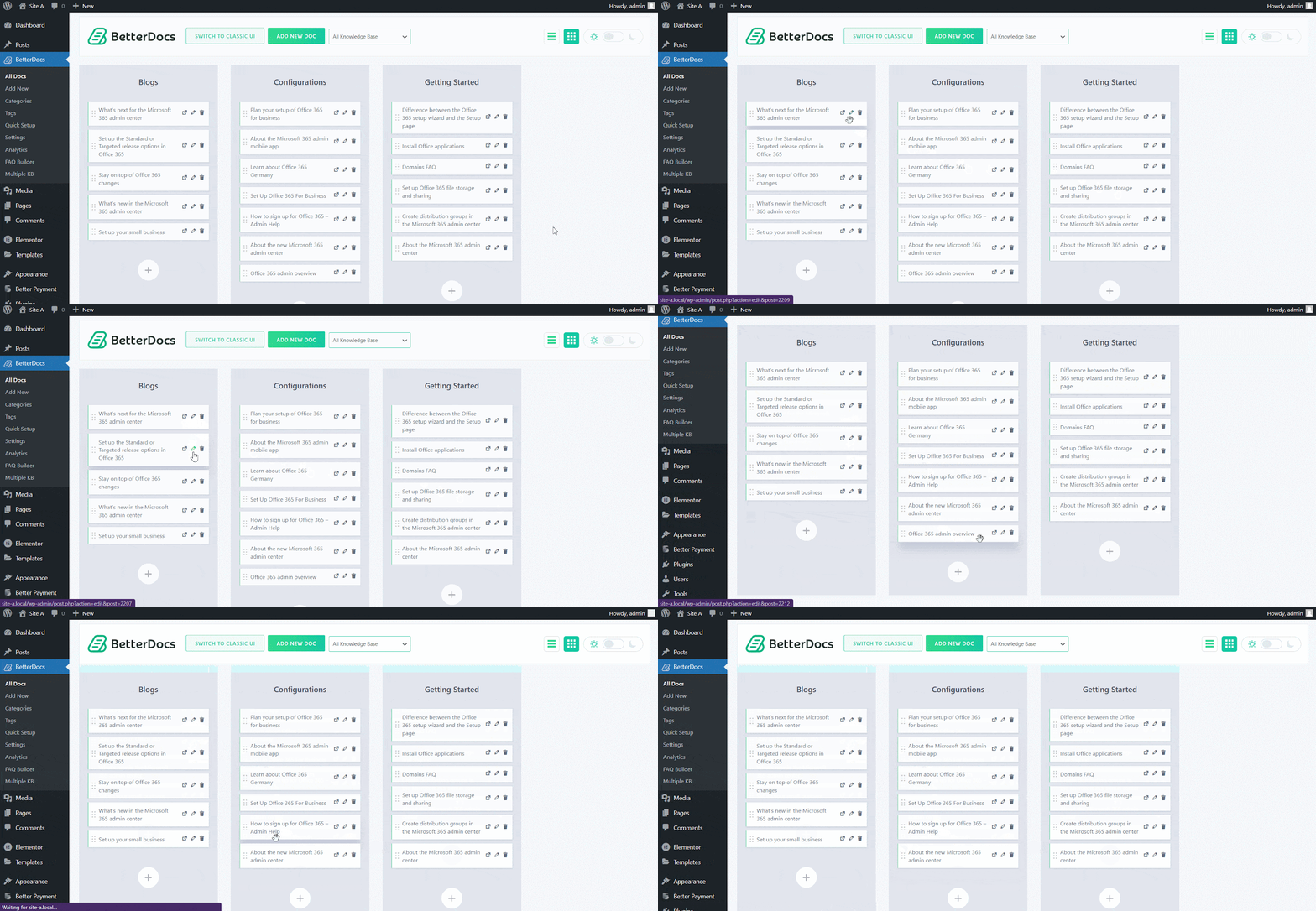
Drag and Drop Builder

This is How, with the help of BetterDocs Drag and Drop Builder, you can organize your content instantly and create a stunning knowledge base for your end-users.

Getting Stuck? Feel free to contact our Dedicated Support Team.

Updated on সেপ্টেম্বর 9, 2024

What are your Feelings

  • Happy
  • সাধারন
  • Sad

Share This Article : Property of MSF

  • Facebook
  • X
  • LinkedIn
  • Pinterest
HOW TO MANAGE CATEGORIES & TAGS IN BETTERDOCS?HOW TO MANAGE CATEGORIES & TAGS IN BETTERDOCS?

মন্তব্য করুন জবাব বাতিল

আপনার ই-মেইল এ্যাড্রেস প্রকাশিত হবে না। * চিহ্নিত বিষয়গুলো আবশ্যক।

Table of Contents
  • Navigate To ‘All Articles’ Page
  • Move Docs From One Category To Another
  • Add A New Article
  • Edit or Delete Articles
  • Home
  • Popular Docs
    • Category Box Sleek
      • Category Box Card
      • Category Box Classic
      • Category Box_Box
    • Category Grid L1
      • Category Grid L2
    • Sidebar L1
      • Sidebar L2 B
      • Sidebar L3 B
      • Sidebar L4 B
      • Sidebar L5 B
      • Sidebar L6 B
      • Sidebar L7 B
    • Related Categories B
    • Archive Doc List L1
      • Archive Doc List L3
      • Archive Doc List L2
    • Category Handbook
    • Multiple KB Box
      • Multiple KB Classic
    • Multiple KB Tab
    • Encyclopedia
      • Encyclopedia Modern L
      • Encyclopedia Retro L
    • FAQ Modern L
      • FAQ Classic L
      • FAQ Tab L
      • FAQ Abstract L
  • Popular Docs
    • Category Box Sleek L
      • Category Box Card L
      • Category Box Box L
      • Category Box Classic L
    • Category Grid Default L
      • Category Grid L2
    • Category Archive List L2
      • Category Archive List L1
    • Encyclopedia Classic L
      • Encyclopedia Retro L
      • Encyclopedia Modern L
    • Multiple KB Sleek L
      • Multiple KB Classic L
      • Multiple KB Card L
      • Multiple KB Box L
    • Sidebar L1
      • Sidebar L2
      • Sidebar L 3
      • Sidebar L 4
      • Sidebar L 5
    • FAQ Abstract Layout
      • FAQ Tab Layout
      • FAQ Modern Layout
      • FAQ Classic Layout
    • Tab View List
    • Attachment_Related Docs
  • Category Box 2 SC
    • Category Box SC
    • Category Grid 2 SC
    • Category List SC
    • Category Grid SC
    • FAQ List Classic SC
    • FAQ List Modern SC
    • Feedback Form SC
    • MK List SC
    • Multiple KB 2 SC
    • KB Tab Grid SC
    • Multiple KB SC
    • Popular Articles SC
    • Search Form SC

সর্বস্বত্ত্ব সংরক্ষিত।